First Page    Prev. Page    Next Page    Last PagePage: 1/1

Thursday, Aug 28 2025

MacBook Pro mini-bug connecting to iPhone as a hotspot

I have noticed that when I tether my MacBook Pro (M1 Max from 2021 running macOS Sequoia 15.6.1) to my iPhone 15 Pro, using the phone as a hotspot, there appears to be a mini-bug such that the Mac displays incorrect information about the phone carrier network generation of wireless technology (3G, LTE/4G, 5G, etc). This is 100% reproducible for me, and I tested it with at least eSIMs from 2 networks: AT&T and T-Mobile. Here are the steps:

1) Start my Mac, click on WiFi connection, selected my Phone as the Personal Hotspot to use for the connection
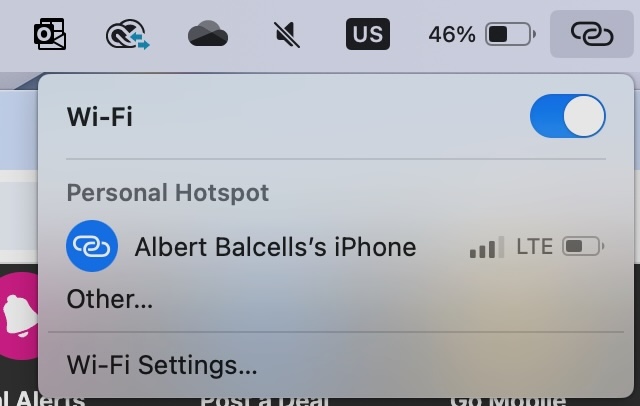
2) Connect to it, and the indicator of the connection displays the phone carrier network as "3G" or "LTE" - this is the bug - while my iPhone shows 5G or 5G+
3) There is a visual indicator mismatch on macOS, since the phone is saying one thing and macOS a different thing for the network wireless generation

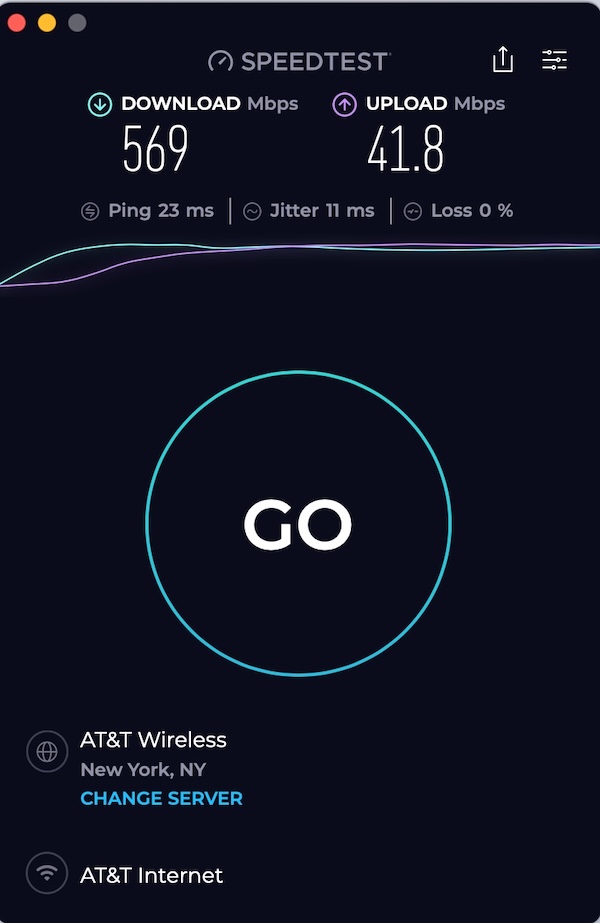
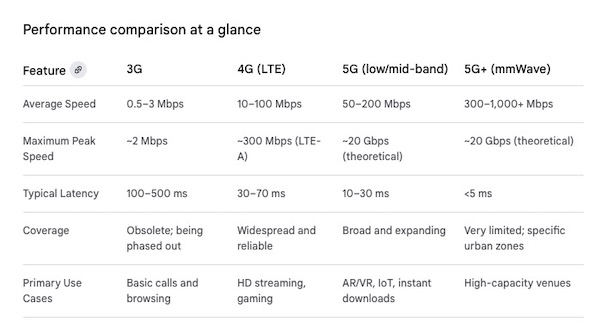
I then thought, who is right, MacOS or the iPhone? I tested the speed of the hotspot connection, and got speeds in the range of 250Mbps to 600Mbps+. This indicates that the speed is consistent with 5G performance, and so the macOS bug is a cosmetic bug, meaning that the hotspot connection is working as expected but macOS is not presenting the correct information.

To validate my claims, I asked ChatGPT for its opinion, and it agreed with what I had found. This is what it said:

“macOS displays a generic cellular type label (3G, LTE, etc.) based on information reported by the phone’s tethering profile. Apple hasn’t fully updated macOS to show “5G” consistently in hotspot indicators, so you may still see LTE or 3G even though the underlying connection is much faster.”

I suppose the bug might be on iOS where the phone is not sending the correct carrier information to macOS for it to display on the laptop. It would seem like this is easy to fix, but I am pretty sure this bug has existed for years...

Some screen shots below illustrating it, as well as a chart of performance for the different wireless generations that backs up my claim that the hotspot is performing at 5G speeds (in the area where I tested it) despite the 3G or LTE label. I have no idea why in the same area, macOS displays sometimes 3G and others LTE (i.e. 4G). What is clear is that the iPhone always displays the correct 5G label.
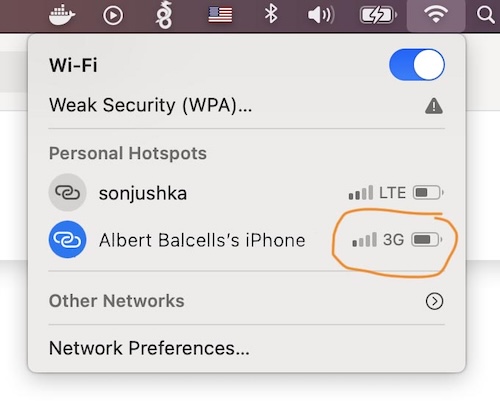
macOS bug displaying the wrong carrier profile cellular type 3G information from my hotspot

macOS bug displaying the wrong carrier profile cellular type LTE information from my hotspot

macOS Speed Test demonstrating 5G hotspot speed despite wrong network label being show

cell networks speed comparison by generation

Monday, Aug 25 2025

Back from our trip to Spain to see grandma

We had a great time, I took Laia and Sofia to see grandma. We spent time at the beach and also at my mom's place and saw the town summer fair. A lot of experiences, the girls had fun but were also excited to get back and get ready for school.

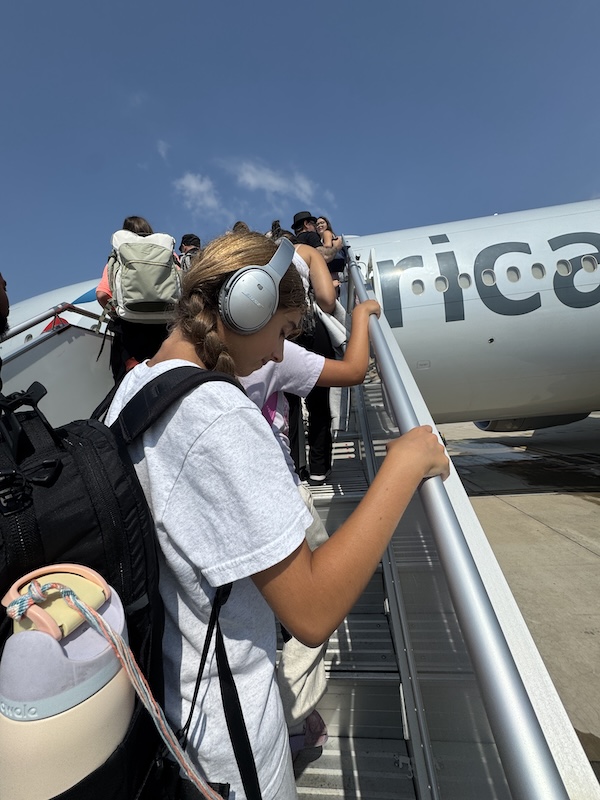
Laia climbing on a Boeing plan to New York

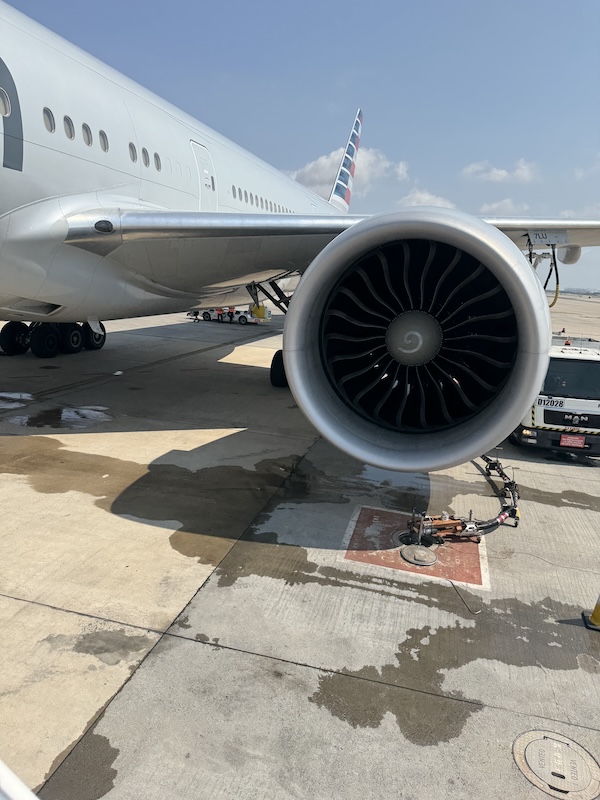
Big jet engine on the plane to New York

Laia and Sofia riding the carnival attractions

La Rana is a popular spinning and jumping carnival ride

Laia loved the bumper cars ride

Tuesday, Aug 5 2025

Sunset ride

We were adventurous and took a sunset trip through the bay, went out through the Moriches Inlet into Cupsogue beach. Water got pretty shallow on the way back but we made it.

Nicole and Albert out for a sunset watching boat ride

Sunset in Senix Creek

Sofia and Laia on the bow watching the sunset

Saturday, Aug 2 2025

eBay and very old accounts - legacy bug associated with paypal linked accounts

So, I don't remember if I talked about this but I was stunned a few months back when I encountered a repeatable pervasive bug on eBay's checkout.

It turns out if you have had an eBay account for more than 20 years - hehe, I have - then some of the code is no longer backwards compatible on the checkout, and it exhibits undesirable behavior. What happens that is that if you select to pay with Paypal, the payment does not necessarily happen on your default payment card. In fact, eBay checkout ignores your selected default payment method on Paypal and they use whatever they want. I suspect the original code did not factor in the possibility of Paypal allowing multiple cards and the ability to change the card you want to use when checking out with Paypal.

I experienced this a few times. The first time I thought I made a mistake selecting the wrong card upon checkout. But in subsequent attempts I noted carefully which card I selected, and the payment still went to a different card. I contacted eBay once I had enough evidence. To my surprise, I was trasnferred to a "specialist" who knew exactly what I was talking about. Without admitting it was a bug on their code, she politely asked me to UNLINK my Paypal account from eBay, and advised that this was the ONLY way to stop this behavior. The checkout on eBay works completely differently now and once you unlink your Paypal account, new code takes over and allows you to select the payment card you want to use for each transaction through Paypal. I was very skeptical of all this, but reluctantly did what the eBay lady asked me after she re-assured me she dealt with this all the time and this was the solution.

Sure enough, after 20 years linked, once I unlinked by Paypal account from eBay, the behavior changed and now I had the ability to select a different card on each transaction and the charges posted correctly.

Legacy bug on eBay checkout when paying with Paypal

First Page    Prev. Page    Next Page    Last PagePage: 1/1