MacBook Pro mini-bug connecting to iPhone as a hotspot
I have noticed that when I tether my MacBook Pro (M1 Max from 2021 running macOS Sequoia 15.6.1) to my iPhone 15 Pro, using the phone as a hotspot, there appears to be a mini-bug such that the Mac displays incorrect information about the phone carrier network generation of wireless technology (3G, LTE/4G, 5G, etc). This is 100% reproducible for me, and I tested it with at least eSIMs from 2 networks: AT&T and T-Mobile. Here are the steps:
1) Start my Mac, click on WiFi connection, selected my Phone as the Personal Hotspot to use for the connection
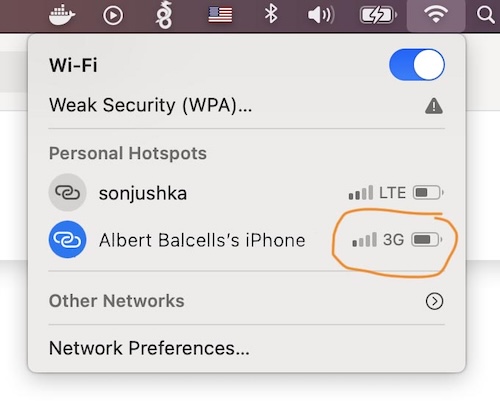
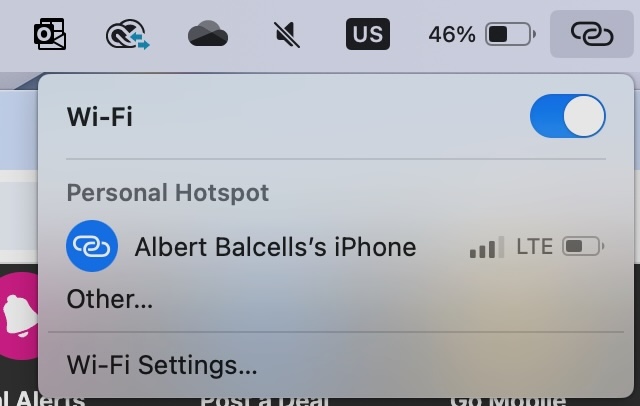
2) Connect to it, and the indicator of the connection displays the phone carrier network as "3G" or "LTE" - this is the bug - while my iPhone shows 5G or 5G+
3) There is a visual indicator mismatch on macOS, since the phone is saying one thing and macOS a different thing for the network wireless generation
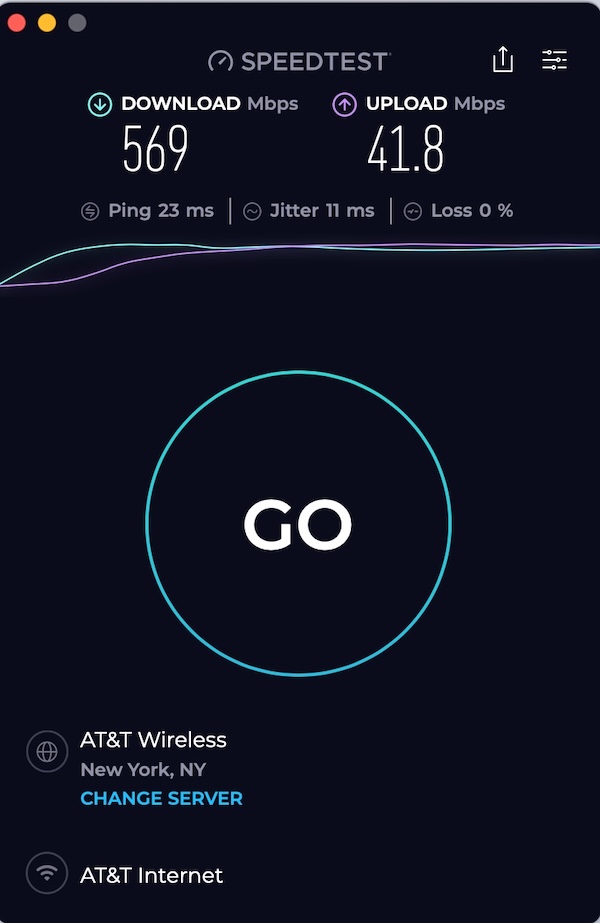
I then thought, who is right, MacOS or the iPhone? I tested the speed of the hotspot connection, and got speeds in the range of 250Mbps to 600Mbps+. This indicates that the speed is consistent with 5G performance, and so the macOS bug is a cosmetic bug, meaning that the hotspot connection is working as expected but macOS is not presenting the correct information.
To validate my claims, I asked ChatGPT for its opinion, and it agreed with what I had found. This is what it said:
“macOS displays a generic cellular type label (3G, LTE, etc.) based on information reported by the phone’s tethering profile. Apple hasn’t fully updated macOS to show “5G” consistently in hotspot indicators, so you may still see LTE or 3G even though the underlying connection is much faster.”
I suppose the bug might be on iOS where the phone is not sending the correct carrier information to macOS for it to display on the laptop. It would seem like this is easy to fix, but I am pretty sure this bug has existed for years...
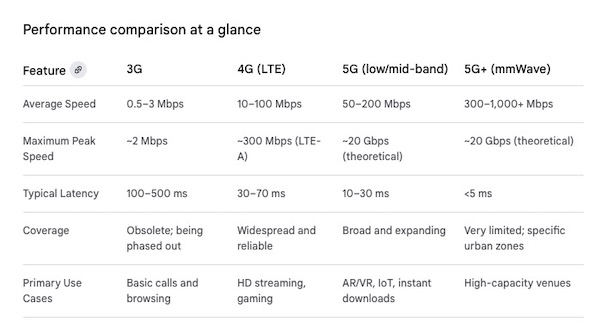
Some screen shots below illustrating it, as well as a chart of performance for the different wireless generations that backs up my claim that the hotspot is performing at 5G speeds (in the area where I tested it) despite the 3G or LTE label. I have no idea why in the same area, macOS displays sometimes 3G and others LTE (i.e. 4G). What is clear is that the iPhone always displays the correct 5G label.