Installed a new WDTV Live Streaming Media Player on my home network. Works well, so far so good. no complaints. Like the new UI and themes.
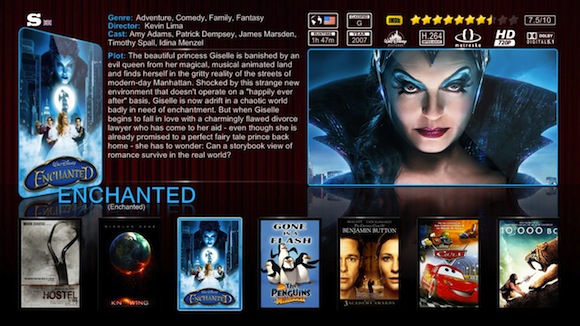
UPDATE: [1/10/2015] Wow, I can't believe it's been over 3 years since I deployed this 2nd generation player on my home network. It has been a great gadget that we enjoyed hundreds of hours thanks to it's still unmatched capability to playback almost any file format known to man. Somewhat surprisingly, WD has made no meaningful upgrades to the device, and has not released any new version w/ new hardware on it. As a result, arm yourself with patience if you decide to buy one of these, I would classify it as odd "old" "early adopter" type device. Those 2 things seem like they don't go together, but this is a rare case of where they do, courtesy of Western Digital's lack on innovation/hunger in the last few years.
At this point in time the device shows its age in a couple different ways:
a) its networking firmware is buggy - despite WD having had years to address certain firmware issues, they never got around to it and/or decided it wasn't important enough to fix it because not enough of their audience used the advanced features/understood them. For example, if you plan on accessing files from your networked NAS and creating a library that draws data across multiple drives, be prepared for lots of little issues as the unit "forgets" the paths fairly regularly and requires re-setting it up. This is widely documented on user forums from dozens of users, but has never been fixed. In fact, the prior version of the unit suffered from the same problems about 5 years ago (not sure that says about WD's engineers  ). The unit will, however, work like a champ whenever you use local storage. So, if you are planning on using it casually via plugging a local USB drive and watching some content, you are in luck. It will work great. You can even have 2 drives plugged in, and works great. A little slow, but great. If you build up a collection and move beyond the capacity of a single drive, after several years using the device and hundreds of hours I can tell you it's best to avoid it's Library feature, it has really never fully worked reliably. Another issue, the networking interface speed. Even though it's marketed as a "gigabit interface", supposedly one of the big upgrades in this unit, it really is not. Technically, the NIC is in fact gigabit, but the built-in CPU cannot push the data fast enough, so you are stuck at about 100 Mbps. That doesn't sound too bad if you are streaming media, but if you regularly copy files to/from the unit across your local network, this gets old really fast, it is far too slow and not acceptable. Particularly since WD has now had several years to upgrade it.
b) The UI is ugly, and the performance is now quite weak by today's standards. I mean this thing is slooooow. Takes a second or two to react to each command. Now, you will get used to it, and it will even feel "normal" but when you experience something faster (see below), you will remember a consumer device is not supposed to be like this for this long. Excellent as a v1, now WD should have released at least 2-3 other revs with upgraded hardware by now. For example, if you have a medium size collection with a few hundreds files that you browse through, and you download movie info for each, it will slow down your WD to a crawl. It's still usable, just a bit painful. If you are a casual user, instead, with a few dozen files on a USB file, no problem at all, the unit is very good.
Overall, this is still a great device and the king of versatility if you need to be able to play a lot of different file formats.The problems I am describing are more "advanced" problems, and will likely not be experienced during "regular" or "casual" usage.
Now, if you want a device that is much more powerful and can basically do the same but much faster and better: get an Amazon FireTV or a FireTV stick and install XBMC (now called Kodi) on it. Plenty of guides online on how to do it, takes 5 minutes. You will not be sorry, I guarantee it. The power of the Amazon hardware, combined with the beautiful and feature rich Kodi/XBMC UI will put you in home theatre heaven