SUMMARY
This article explains how to easily setup your own high quality Apple Airplay-capable speaker system in less that 15 minutes,
and spending around $100. This system will produce great quality sound that rivals high end models like the Libratone, or
the Zeppelin Air,
which cost many hundreds more.
If you are interested in a higher-end system you can read Part II of this series which talks
about how to build an audiophile quality Airplay speaker system capable of producing extraordinary quality sound.
GETTING STARTED
The process is very easy, and anybody can do it. We are going to select 3 components that you can buy anywhere - I recommend Amazon -
and we are going to connect them together using plain speaker wires, and a 3.5mm audio mini jack.
1. The Speakers
First, we need a pair of good speakers. We could spend as little or as much as we wanted here, but for the purposes
of this project, which entails keeping costs at around $100, I am going to recommend a pair of the trusty Sony SS-B1000 5 1/8-Inch Bookshelf Speakers.
While Sony isn't known for building high end speakers, these bookshelf units are actually excellent for the price, have plenty of power,
and produce great, warm sound. Simply put, they cannot be beat dollar for dollar. Go ahead, check the reviews if you want, Amazon has
over 900 reviews for these, and they average 4.5 stars. For the price you cannot possibly go wrong.
Update (8/25/2015): These used to be such a bargain that Amazon kept playing with their price, moving it up.
They now go for as high as $80 at times. Still a good deal, but given the price point I think other options
trump the Sonys, and so I am going to recommend as an alternatice the Micca MB42 Bookshelf Speakers.
They have over 400 reviews on Amazon with a solid 4.6+ stars. These are nice looking, solid, well balanced speakers
with strong bass and great soundstage. They will easily outperform much pricier speakers and you will be glad
you bought them. For $50, basically unbeatable, a small sonic treasure. If your budget is a little richer, you
can go for the Micca MB42X which will run you about $90 for a slightly better sound thanks to an optimized crossover.
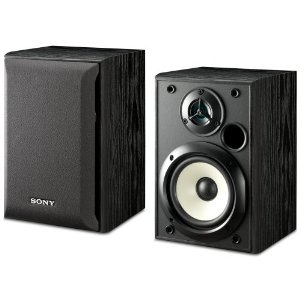  Sony SS-B1000 5 1/8-Inch Bookshelf Speakers (Pair)
Price: $45 to $80
Sony SS-B1000 5 1/8-Inch Bookshelf Speakers (Pair)
Price: $45 to $80
Alternative
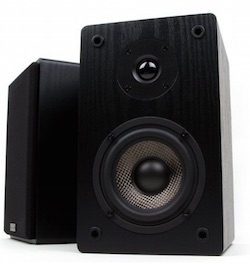
Micca MB42 Bookshelf Speakers
Price: $50
Update (8/21/2014): I get frequent questions and requests about which speakers to get,
so I wrote a quick guide on the Best Speakers You Can Buy Under $100
2. The Amplifier
Next, we need an amplifier. After doing tons of research, I settled on the little known Lepai Tripah TA2020 mini amplifier. I wanted something
unintrusive, durable, small and reliable. This is a tiny silver box, about 5" x 5" x 2", that weights less than 1 pound, so you can fit it anywhere.
It's simple and straight forward to use: a volume control,
bass and treble controls, 2 speaker connections in the back (wires), and an input connection, which accepts both a mini-jack (headphone-style connector)
or an RCA (white/red) connector. Also comes with a little power supply to power it up.
Don't be fooled by its size, this thing gets LOUD. It is plenty powerful to fill a large room in your house, I run mine at about 20% of its power.
Note that this is a Class-T amplifier, which means it is going to create distortion free quality sound. You could easily be paying hundreds more for
lesser systems. Reviews are high everywhere, 4.2 stars in Amazon. And the best part is its price.
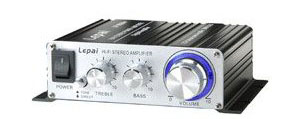 
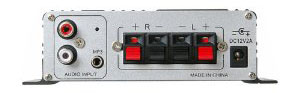 Lepai Tripath TA2020 Class-T Hi-Fi Audio Amplifier
Price: $27
3. Wireless Streaming
Alright, the third and last piece to this puzzle is the key to our audio streaming capabilities: we need an Apple Airport Express unit. These are the small,
square Apple wireless airports. Apple has produced three different models: the original one (M9470LL/A, model A1084), a newer one (MB321LL/A known as
model A1264 in 2012), and the most recent one (MC414LL/A, model A1392 - which adds an additional Ethernet port, new design, and simultaneous dual band,
but aside from those minor tweaks it's basically unchanged).
Either one of them will work for our purposes, the A1084 was first manufactured around 2007, so it's a 802.11g unit, which means it maxes out at 54 Mbps,
but that will work fine since audio streaming only needs a tiny fraction of that bandwidth. The newer units are 802.11n capable units,
and you will find them on the Apple store for $99 or on Amazon for a little less, about $89. If you head to eBay, you may be able to find an old A1084 for
about $35 to $40 but keep in mind this is older technology by today's standards. If you also want to also use the airport as a wireless
access point in your house or apartment, I recommend you get the newer model. It can join you existing network, act
as a repeater, or create a network of its own. It has an ethernet 10/100 port, a USB port for printer sharing, and most importantly, a 3.5mm audio jack!
That precious jack is what we are going to connect to the Lepai amplifier. I think it's worth noting that the reason the airports are so well suited
for the purpose of streaming music is because they have a high performance DAC built-in (digital-to-analog converters). You can bypass
the internal DAC and use your own by connecting a mini-tosklink cable to the audio jack if you prefer, but in most cases it will not be worth it.
You would have to spend many hundreds of dollars, even thousands, to get noticeably superior sound. The built-in DAC is just very good to excellent.
An alternate option here is to get an Apple TV. That is a good choice because it can do more than act as an AirPlay target, you will be able to
use it to watch Netflix, and all kids of other content, plus it's now very reasonably priced at around $69. The drawback it has is that it doesn't come
with a classic 3.5mm audio jack, but rather with an HDMI and an optical Toslink port, and so you will need to buy a small adapter to convert the optical
signal to an analog signal so you can hook it up to the Lepai. That is, unless you already own an amplifier with a free HDMI or Toslink input, in which case you
could use either of those ports and you are good to go, you don't even need the Lepai.
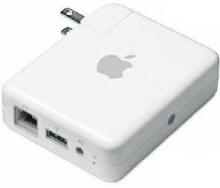
 Apple Airport Express New Model [$89 on Amazon] Apple Airport Express New Model [$89 on Amazon] Apple AirPort Express with Air Tunes M9470LL/A [OLD VERSION on eBay ~$35]
Apple TV [~$67 on Amazon]
FiiO D3 Digital to Analog Audio Converter [~$27 on Amazon]
Price: $35-$89
Update (7/16/14): Yet another option for wireless streaming is available. It's an interesting device: the Sabrent Wifi Audio Receiver. It is a small portable device that supports
both AirPlay and DLNA. It is a plug-and-play device, easy configuration and no computer needed. It only costs about $20, cheaper than any Airport Express.
The product is relatively new, but it is getting very good reviews on Amazon, about 4 stars.
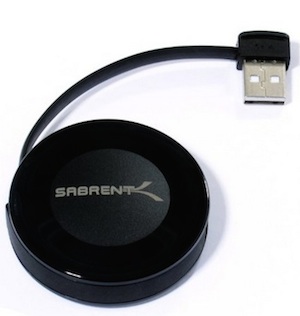
 Sabrent Wifi Audio Receiver (Supports DLNA and AirPlay) for Home Stereo, Portable Speakers (WF-RADU)
An alternate option if you don't use Apple devices is going Bluetooth. You can get a simple AmazonBasics Bluetooth 4.0 Audio Receiver.
This is a simple and effective unit that gets the job done. Note that the sound quality for Bluetooth does not quite match what you get via Airplay, as
Bluetooth compresses the sound, but in vast majority of cases cases you will still be very satisfied.
Price: $20
4. The Cables
If you don't already have speaker wire and a male-to-male mini-jack cable, you can pick those up at Radio Shack or anywhere else, including Amazong. Here are a couple
good options:
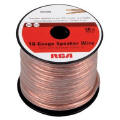  RCA AH1650SN 50 Ft. 16-Gauge Speaker Wire
Price: $8
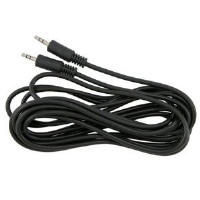  3.5mm Stereo Male To Male Cable 12 ft.
Price: $3
Note: If you are using the AppleTV, and connecting via the Optical Toslink port, you will need instead:
AmazonBasics Digital Optical Audio Toslink Cable - 6 Feet (1.8 Meters) [about $5] Mediabridge 3.5mm Male to 2-Male RCA Adapter (6 Feet) - [about $10]
------------------------------------------------
Grand Total: $106
------------------------------------------------
CONFIGURATION
Configure the Airpor Express using your computer and following the instructions from the Setup Assistant software from Apple.
It will give you the option to specify that you want to use AirTunes to play music on your stereo from iTunes. You will also be
able to name it - and this name is what iTunes and other software will see and use to connect to the system.
Once you have your airport up and running on your network (solid green light on), connect the 3.5mm mini jack from the Airpot Express to the Lepai amplifier
input lalbeled "MP3" on the back.
Last, use your speaker wire to plug the Sony speakers to the Lepai amplifier speaker outputs, left and right.
As far as the source of your music, you can use iTunes, which will now see your Airport Express as a speaker target. You can also use iPhones and other Apple devices, which will see your speaker, and will be able to stream to it - thought note that only via iTunes you will get the full quality of your music collection. If you stream from your iPhone for example, the sound is further compressed, which does not happen from iTunes. You can also use the Apple Remote app to control your desktop or laptop from your phone or iPad/iPod Touch and play your music, that will work too.
If you don't like iTunes - I don't like it myself, their XML database becomes way too slow if you have a large library of
music - you can use other software-based solutions, such as the excellent Airfoil.
Airfoil will capture sound from any source on your computer, Mac or PC, and let you stream it. For example, I use Spotify and stream my music
to one of the 3 different Airplay-enabled zones in my apartment. Works flawlessly, connects to airplay fast and reliably.
I leave my Lepai running all the time, it consumes very little power, and I can play music whenever I like.
PS: If you end up using the AppleTV, connect the Toslink cable from the AppleTV to the little FiiO converter box, and then the Mediabridge 3.5mm to RCA cable
from the other end of the FiiO box to the Lepai. And you are all set.
RESULTS
You will be amazed by how flexible this little system is. It's small enough to fit anywhere, you can tuck it away
in your kitchen, den, bedroom or living room. You can surprise your friends from your iPhone or iPad, you can play your
favorite music from Spotify without having to bother turning on your "main" stereo and switching to the correct input, and more.
It is so easy to use that even non-techies can learn how to use it from iTunes to listen to their music.
The quality of sound produced will easily surpass systems costing many hundreds more, and all for around $100, less if you
already have an old Airpot Express around, or an old amplifier.
Hope this was useful and enjoyable. Next: I will take you through how to upgrade the system
to an even nicer system in Part II of this series.
END
|
